July 22, 2026 in Blend momentum
Autopilot Update: A Pre-Underwriting Summary That Shows Its Work, and Sharper Income and Asset Judgment
When Autopilot became commercially available, we laid out our first priority: making the agent more dependable. That's where the last stretch of work went.

This is our first update since launch, and two major capabilities shipped in this period. The pre-underwriting summary a lender reads has been rebuilt so that every figure in it traces back to the document it came from. And the agent’s income and asset judgment is now anchored, case by case, to the evidence actually on the file.
Neither adds a new button. Both change how much weight a lender can put on what Autopilot produces.
Going forward, these updates will arrive biweekly, each covering two weeks of shipped work.
A pre-underwriting summary that shows its work
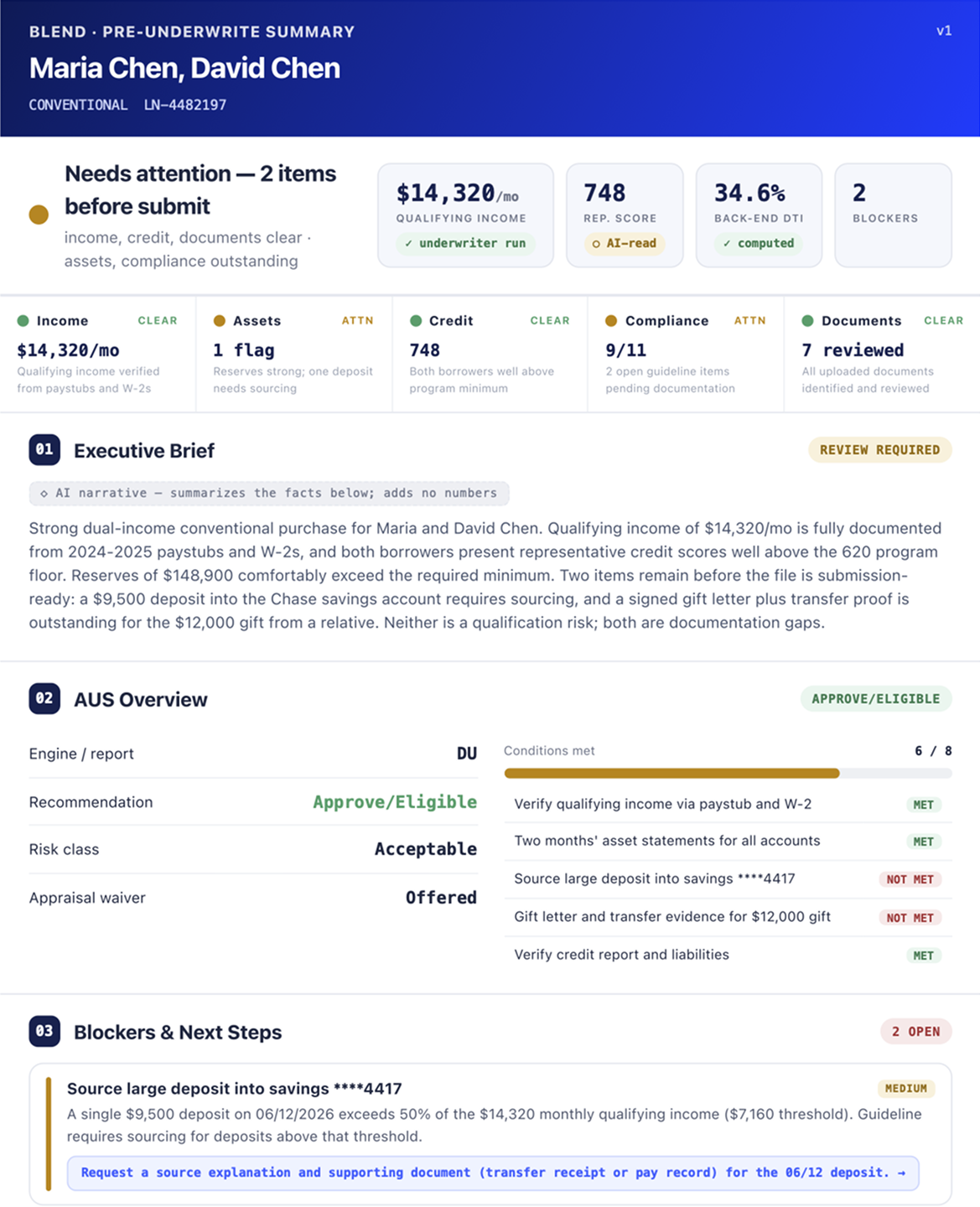
When Autopilot finishes a pre-underwriting review, it produces a summary: qualifying income, assets, compliance, and the metrics an underwriter reaches for first. We rebuilt how that summary is generated so that every number in it is traceable back to the source it came from.
The summary now renders directly from Autopilot’s verified findings. Qualifying income is broken out by source, with an explicit addition step showing how the total is reached. Employment appears per employer, with status, type, and start and end dates. Asset balances trace to the specific statement they were read from. Where Autopilot has not reviewed something, the summary says so plainly rather than leaving a gap or filling it in.
The point is auditability. A summary a loan officer can trust is one they can check. When every figure carries its provenance, the person reading it can see not just what Autopilot found but the document behind the finding, and can move faster because of it. This is the kind of work that does not add a new button, but it changes how much weight a lender can put on what they are reading.
Sharper income and asset judgment
Subscribe to Autopilot updates
Alongside the summary, we continued tightening how the agent reaches its income and asset findings, on a consistent principle: tie the output to evidence actually on file.
- Income is corroborated, not inferred: Autopilot no longer derives base income from a W-2 on its own and instead grounds the figure in the supporting documentation before committing to it.
- Document requests are gated on evidence: A request for tax documents now goes out only when what is on the file actually calls for it, rather than as a default step.
- Asset review stays on the statements in hand: Asset extraction is scoped to the statements present on the loan, so the agent works from what it can see rather than reaching beyond it.
- Variable income is reconciled: Overtime and other variable income are reconciled against the file so the qualifying figure reflects what the documentation supports.
Each of these keeps the agent’s output anchored to the loan in front of it, which is what makes the income and asset figures more useful for the lender’s review.
Under the hood improvements for speed and reliability
Not everything this period is visible in a workflow. Several changes went into making Autopilot faster and more reliable across the range of files it sees.
- Faster review performance: Vertex AI routing is live in production, and asset-statement extraction now runs as parallel per-document calls rather than one after another. Together, these make reviews faster without changing what the lender sees.
- Stronger model resilience: The income and asset tools now fall back to a secondary model on transient errors, so a momentary hiccup upstream does not stall a review.
- Broader regression coverage: The evaluation framework now runs a full automated sweep every night. Every customer-reported fix ships with a regression scenario, so the coverage that protects against a repeat issue grows each time one is resolved.
Blend Autopilot is now commercially available to Blend customers. To get started, contact your Blend account team.
We publish a new update every two weeks. Subscribe to Autopilot updates to stay current with everything we’re shipping.
Find out what we're up to!
Subscribe to get Blend news, customer stories, events, and industry insights.
Autopilot Update: Meet the First Wave of Customers
The first wave spans the full lending landscape. See what Autopilot's first commercial wave signals for the industry.
Read the article about Autopilot Update: Meet the First Wave of Customers
Autopilot Enters Its Next Chapter
16 weeks. 25,500 loans. See what early adopters helped Autopilot become.
Read the article about Autopilot Enters Its Next Chapter
Blend Autopilot Week 16 Update: A First Look at Selective, a New Follow-Up Mode for More Control Over Borrower Requests, and Continued Hardening
More control over borrower requests, one rule at a time. See how lender feedback is shaping Autopilot.
Read the article about Blend Autopilot Week 16 Update: A First Look at Selective, a New Follow-Up Mode for More Control Over Borrower Requests, and Continued Hardening