
November 2, 2026 in Blend momentum
Navigator Mobile Is Now in Beta: Your Pipeline, in Your Pocket
Last month we gave lenders a first look at Navigator Mobile at MBA Annual. Today the beta version is live in the App Store for Autopilot customers on iPhone.

Your loan pipeline doesn’t stop moving when you leave your desk. Now, neither do you.
Today, we’re introducing Navigator Mobile, a new way for loan officers to stay connected to their pipeline, see what needs attention, and take action while on the go. Powered by Blend Autopilot, Navigator Mobile brings proactive updates, a pipeline-wide view, and conversational AI directly to your iPhone.

And this isn’t simply Navigator Web on a smaller screen. It’s an entirely new experience built for how loan officers work beyond their desks, whether they’re between appointments, meeting with borrowers, or out in the field.
Now in beta and available exclusively to Blend Autopilot customers on iPhone, Navigator Mobile helps loan officers stay one step ahead, wherever the day takes them.
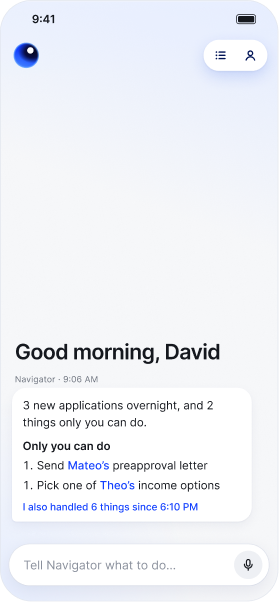
Start your day one step ahead
Open the app and Home tells you what Autopilot did on your loans since you last looked. It also flags new applications and applications borrowers have finished. When a borrower finishes uploading documents, you get one summary after Autopilot has reviewed them, such as “Maya uploaded 5 documents. Income supports $11,000/mo; August statement still needed.” A clean upload posts nothing.
A scheduled morning check reads every loan assigned to you and surfaces the ones that need attention, including the ones a busy loan officer is most likely to miss: a lead nobody answered, a closing date that’s quietly getting close. It’s one message per moment, never one per document.
Navigator Mobile shows every loan assigned to you, searchable by loan number, and brings the ones that need you to the top. On the web, Navigator works inside one loan at a time. Mobile is where Navigator works the pipeline.
You don’t go looking for the work. You open the app and the work is already sorted. Five minutes in a parking lot is enough to know which files need you.
It’s Monday at 8am. Over the weekend Autopilot reviewed four paystubs on one file, recalculated qualifying income on another, and sent two document requests on a third. Home opens with those three lines, plus a bank statement request that’s been sitting unanswered for nine days on a loan closing in three weeks.
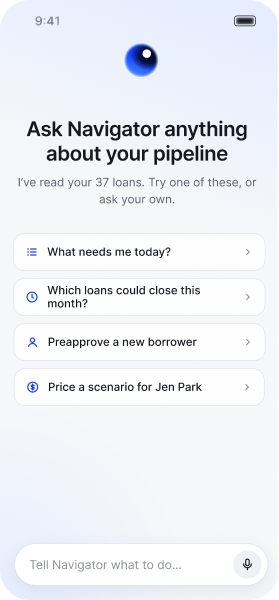
Ask about any loan. See where the answer came from.
Need a quick update before calling a borrower? Wondering what’s holding up a loan? Just ask Navigator.
With voice or text, you can ask questions about individual loans or your broader pipeline, without navigating through multiple screens.
Ask things like:
- “Which loans need my attention today?”
- “What’s happening with the Johnson loan?”
- “What changed on this loan since yesterday?”
Navigator draws on loan information and Autopilot’s findings to answer your questions, with references to the underlying information so you can see where an answer came from. And when Autopilot has identified something that needs a closer look, you can dig into the details, review the supporting information, and decide what to do next.
Keep loans moving, even when you’re away from your desk
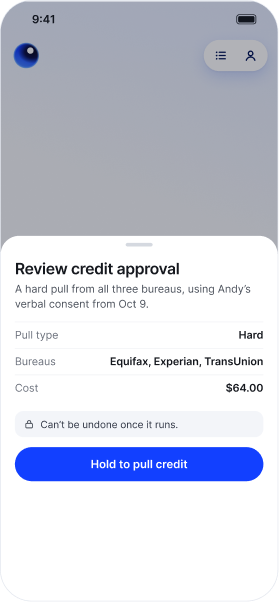
Navigator Mobile doesn’t just help you understand what’s happening. It helps you act on it.
Whether you’re following up with a borrower or checking on a loan between appointments, you can tell Navigator what you need in plain language.
Ask it to prepare a borrower request, update loan information, or help move a loan forward. Navigator works through the request and presents actions that require your approval before proceeding.
You stay in control, reviewing what’s prepared and approving consequential actions before they’re executed. And because Navigator Mobile is designed for the phone, you don’t have to type out a long request. Just tap the microphone, say what you need, and let Navigator take it from there.
Built for the way loan officers work
Navigator Web and Mobile share the same foundation: Blend Autopilot. But each is designed for a different part of the loan officer’s day. On the web, Navigator works inside an individual loan, helping you dig into the details, ask questions, and complete loan-level workflows. On mobile, the experience starts with your pipeline. Navigator helps you catch up on what’s changed, prioritize what needs attention, and take action while you’re on the go.
Together, they give loan officers more ways to work with Autopilot, whether they’re sitting at their desks or moving between appointments.
See what’s possible
| What you can do | How it works |
|---|---|
| Start your day with Home | A recap of what changed since your last look, plus a once-a-day morning check |
| Ask about your whole pipeline | Questions like “which loans need me?” get answered across every loan assigned to you |
| Find any loan fast | Search by loan number, and sort by most recent or by what needs attention |
| Ask about a loan | Answers cite their source, and if Autopilot hasn’t reviewed something, Navigator says so instead of guessing |
| See what Autopilot changed | One card per review: what needs you first, then every field changed and every finding raised or cleared |
| Create a lead in one sentence | Then share your application link or QR code |
| Price a what-if | Price a hypothetical without touching the loan, or quote a prospect and turn it into a lead in one tap |
| Text and call from the loan | Drafted texts open in Messages and send from your own number, and a call card dials the borrower |
| Take action with your approval | Pull credit, run pricing and lock, run AUS, send preapproval letters and disclosures, request and review documents |
| Do several things at once | Ask for several actions in one message and approve them in one round |
| Set reminders | Say “remind me to check on the Garcia appraisal Thursday,” and Navigator brings it back to you on Thursday. Push notifications must be turned on, otherwise the user won’t see the reminder until the app is opened. |
| Talk instead of type | Hold to talk. Speech becomes text on your phone, so no audio leaves it |
Subscribe to Autopilot updates
Get early access to Navigator Mobile
Navigator Mobile is now in beta, available exclusively to Blend Autopilot customers on iPhone. The app is available in the Apple App Store, with Android support coming soon. Eligible customers can work with their Blend team to enable access.
If you’re interested in Navigator and don’t yet have Blend Autopilot, contact your Blend account team or request early access here.
For more on what’s shipping across Autopilot and Navigator, visit our changelog. It is updated weekly with everything new and improved across Autopilot.
Find out what we're up to!
Subscribe to get Blend news, customer stories, events, and industry insights.
Autopilot Update: Easier Pricing and Fee Changes in Navigator
Price the loan, save the scenario, change the fee. Without leaving the conversation.
Read the article about Autopilot Update: Easier Pricing and Fee Changes in Navigator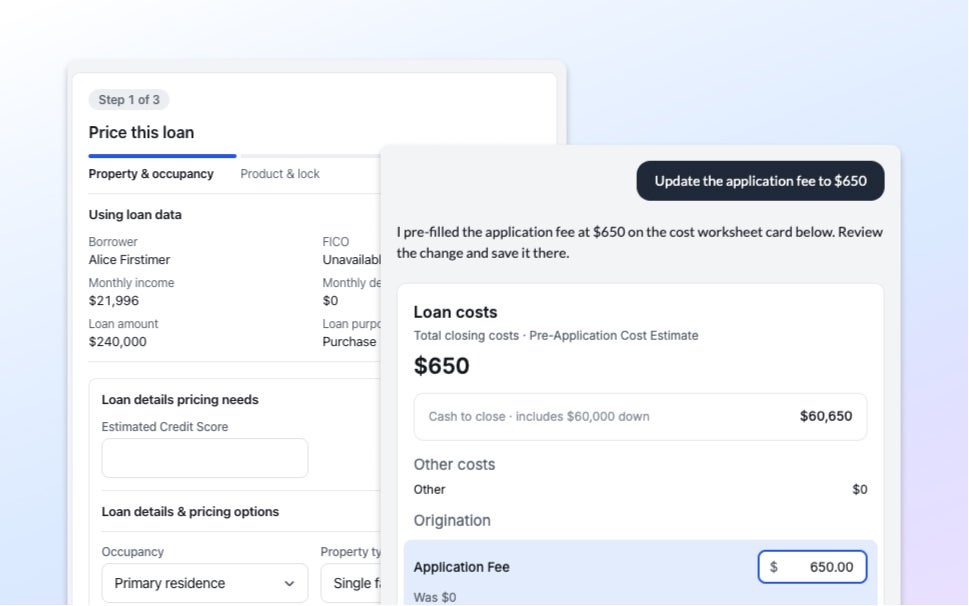
Autopilot Update: Bank Statement Checks, More Income Formats, and Borrower Request Controls
If the transactions don't add up, the statement doesn't pass. Three changes to how Autopilot reads documents.
Read the article about Autopilot Update: Bank Statement Checks, More Income Formats, and Borrower Request Controls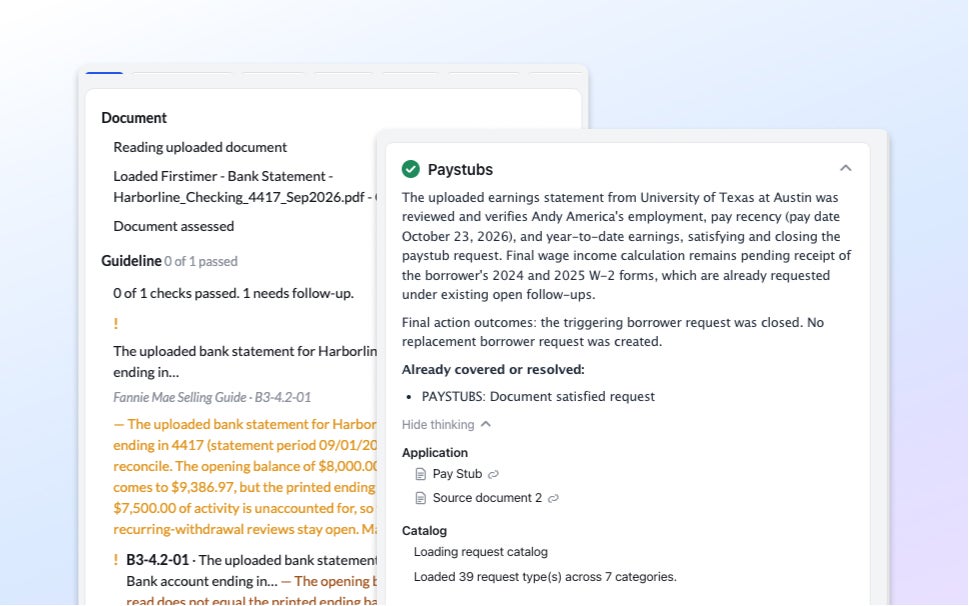
The Mortgage Funnel Doesn’t Work the Way Most Lenders Assume
A year of origination data shows where mortgage funnels actually lose borrowers, and it's rarely where you'd expect.
Read the article about The Mortgage Funnel Doesn’t Work the Way Most Lenders Assume