June 17, 2026 in Blend momentum
Blend Autopilot Week 15 Update: Sharper Underwriting Precision, Stricter Document Checks, and a Fuller Rapid Loan Picture
Autopilot Weekly Update: Week 15

Accuracy is the quiet craft behind good underwriting: the right flag raised, the needless question left unasked, the file described exactly as it stands.
It is also the kind of work that compounds, and this week went almost entirely into it across three angles. The team improved how carefully the agent reasons over a file, what it notices is missing, and how faithfully it describes what it found.
All of it pointed squarely at precision, in the places a lender actually looks.
Sharper pre-underwriting precision
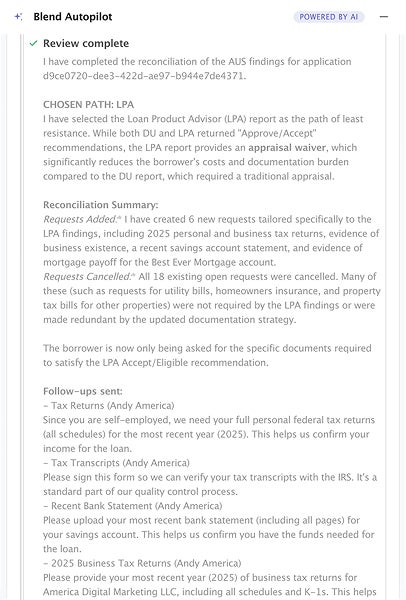
Most of the week went into the agent’s reasoning: the small logic checks that, when they go wrong, turn into a wrong flag on the file or a question the borrower never should have been asked. Several of those got fixed at once.
The agent reads automated underwriting findings, and in some cases made weak assumptions. When a loan ran through Desktop Originator, the agent would sometimes relabel it as Desktop Underwriter, since both run Fannie Mae’s engine, and the names blur together. They are not the same submission, and an underwriter reading the summary deserves to see the one that actually ran.
More importantly, when an automated underwriting run errored or never happened at all, say a soft credit pull that could not produce findings, the agent would fill in a recommendation anyway. Now it reports the system that was actually submitted, and if there is no real recommendation, it says so instead of inventing one. The summary reflects what the underwriting engine returned, not what the agent assumed it would.
Dates got more careful too. The agent checks documents for dates that fall “in the future,” a normal red flag for a doctored or mistyped document. The trouble was its definition of the future: it had been measuring against the application date, so a pay stub dated perfectly normally a few weeks after the application, but before today, looked suspicious.
It now anchors that judgment to the current date, the way a person would. A document dated after the application but on or before today is just a recent document, and the agent stops flagging it as a problem.
Address matching learned to read the way people write. When the agent compared addresses across documents, small cosmetic differences could trip it up: “123 Main St.” against “123 Main Street,” or a difference in capitalization. Each near-miss could turn into a letter of explanation the borrower had to write for an address that plainly matched. The agent now normalizes common street-suffix abbreviations and case before comparing, and only asks for an explanation when the addresses genuinely differ.
The same restraint went into name checks on asset statements, which now flag a name letter only for substantive mismatches rather than trivial ones.
Two more refinements contribute towards the file’s accuracy. When a borrower uploads the wrong document, the agent re-requests the correct one even if its attempt to reclassify what it received fails, so a misfire never leaves the request silently dropped. And it now tailors how many months of asset and bank statements it asks for based on the loan purpose, since a purchase and a refinance carry different requirements, while still honoring any stricter lender overlay.
The throughline is restraint. Each of these is the agent declining to raise a flag or an ask that would not be warranted, and being precise about the ones it does.
Stricter checks on the documents themselves
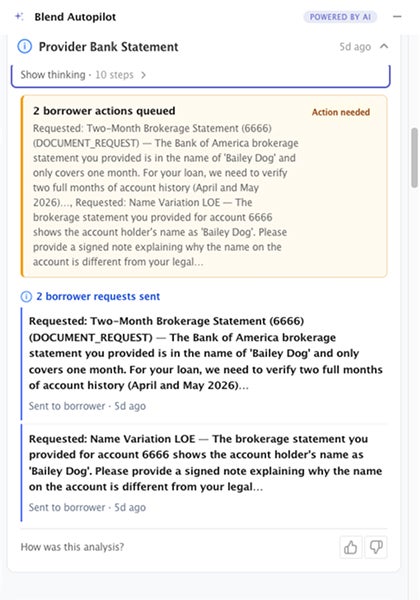
Accurate judgment depends on complete documents, and this week Autopilot got better at noticing when a document is only partly there.
Bank and asset statements print their own page counts, such as “Page 1 of 8” or “Page 10 of 12.” The agent now reads those totals and holds the upload to them. If a statement says it runs twelve pages and only one interior page came through, the agent treats the statement as incomplete rather than scoring the fragment as if it were the whole thing.
The borrower gets a plain-language note back, something close to: “This statement appears incomplete. It shows page 10 of 12. Please upload the full statement.” Instead of a confusing follow-up about transactions the missing pages would have explained.
When a statement prints no page total but carries a beginning and ending balance summary, the agent reads it as whole. The goal is to catch the genuinely partial uploads without creating noise on complete ones.
This is one part of a broader push to make Autopilot’s real-time document validation more rigorous across every document type it reviews.
A fuller picture of a Rapid loan
Last week, borrower chat learned to see Rapid loans. This week the picture the agent paints of a Rapid loan, for both the borrower and the loan officer, got considerably more complete.
Subscribe to Autopilot updates
When someone asks Autopilot about a Rapid loan, the summary it builds now includes the subject property itself: its address, property type, how it will be used, and its estimated value, along with the liens recorded against it and the loan’s product terms. A loan officer asking “what is this loan” gets the shape of the deal in one answer, instead of a status with no substance behind it.
The agent is deliberate about what it pulls in. It surfaces only the subject property and leaves out account identifiers and other properties, so a borrower in a joint application does not see details that are not theirs to access.
The status side got reworked in the same spirit. Rather than a flat status string, the agent now presents the application as an ordered set of checkpoints: where the borrower stands, which step is currently waiting on them, what is already done, and what each remaining step is asking for.
Steps that are not part of this particular loan’s path are dropped rather than shown as phantom to-dos. The answer to “where am I and what’s left” now reads like a real progress map of the actual loan.
Under the hood: Testing and infrastructure improvements
Beyond the headline validation work, the team invested in the testing and plumbing that keeps it honest:
- Document validation, measured: The stricter document checks above sit on top of a growing evaluation suite that grades the validation pipeline against known-good and known-bad examples for each document type. This week added end-to-end checks across pay stubs, W-2s, bank statements, and tax returns, per-document-type field-coverage requirements so a check cannot quietly skip a field, and dedicated case matrices for pay stubs and bank statements. It is the scaffolding that lets the team tighten accuracy without guessing whether a change helped or hurt.
- Cleaner answers, better routing: Resolved follow-ups are now filtered out before the pre-underwrite summary is generated, so the loan officer is not shown items that are already handled. Questions about a Rapid loan’s progress route to the right data tools, and internal tool-call details are scrubbed from the loan-officer-facing summary so the writeup reads cleanly. A redundant data-fetching tool was retired to keep the agent’s reads consistent.
- Evaluation infrastructure: The team stood up routing that sends pre-merge evaluations to a dedicated test tenant, keeping accuracy benchmarks reproducible and off production data.
Under-the-hood improvements ship automatically to every lender with Autopilot activated.
This week was a deliberate investment in working towards accuracy. What shipped was an agent that reasons more carefully over a file, declining the flags and borrower asks a careful underwriter would not raise, noticing when a document is only partly there instead of grading the fragment, and describing a Rapid loan, its property, its terms, and its real progress faithfully enough to act on. The week added up to a simple thing worth saying plainly: Autopilot got more precise, in exactly the places a lender would check.
Blend Autopilot is currently in preview and available at no additional charge during the preview period for all Blend customers. To get started, visit your Lending Config Center or contact your Blend account team.
We publish a new update every Wednesday. Subscribe to the Autopilot weekly update to make sure you stay up to date with everything we are shipping.
Find out what we're up to!
Subscribe to get Blend news, customer stories, events, and industry insights.
Blend Autopilot Week 14 Update: Borrower Chat Comes to Rapid Loans, Smarter Large-Deposit Requests, and a Loan File That Fills In More of Itself
Rapid loans now get the full borrower chat experience. See what else shipped in week 14.
Read the article about Blend Autopilot Week 14 Update: Borrower Chat Comes to Rapid Loans, Smarter Large-Deposit Requests, and a Loan File That Fills In More of Itself
Blend Autopilot Week 13 Update: Autopilot Fills In Verified Assets and Income, Picks Up Unassigned Loans, and Respects Loan Officer Judgment
Autopilot now fills in what it finds. See how the agent does more of the file's actual work.
Read the article about Blend Autopilot Week 13 Update: Autopilot Fills In Verified Assets and Income, Picks Up Unassigned Loans, and Respects Loan Officer Judgment
Blend Autopilot Week 12 Update: The Intelligent Analytics Agent, Self-Serve Capability Toggles, and VA/FHA Production Hardening
More visibility, more control, and more reliability in every loan.
Read the article about Blend Autopilot Week 12 Update: The Intelligent Analytics Agent, Self-Serve Capability Toggles, and VA/FHA Production Hardening