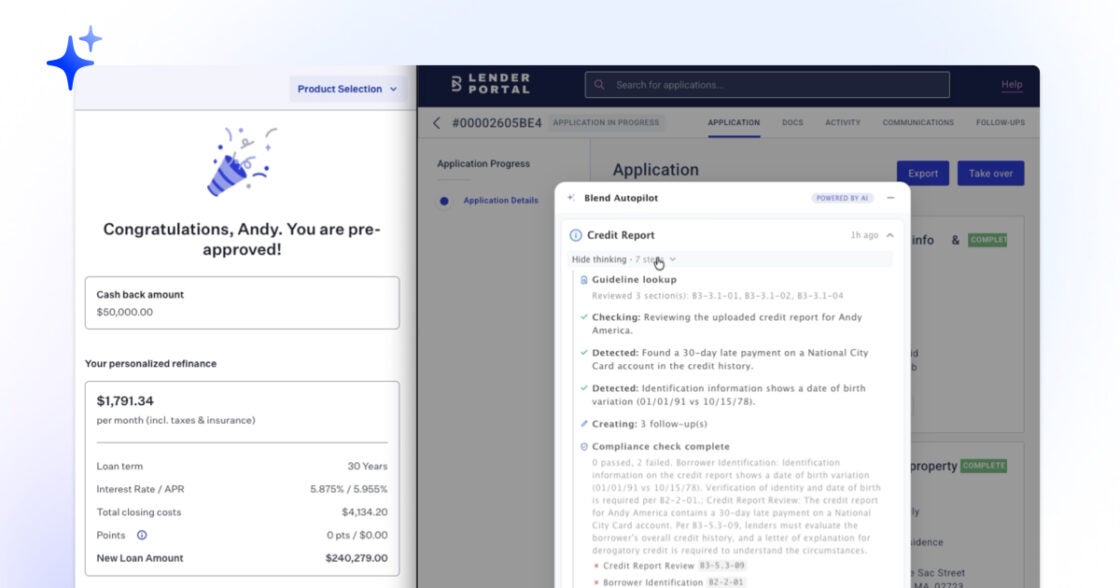
May 27, 2026 in Blend momentum
Blend Autopilot Week 12 Update: The Intelligent Analytics Agent, Self-Serve Capability Toggles, and VA/FHA Production Hardening
Autopilot Weekly Update: Week 12

Your data just learned to talk.
Subscribe to Autopilot updates
Every week, lenders ask us a version of the same question: how is Autopilot performing? What KPIs are moving? This week, the answer arrives.
The Blend Intelligent Analytics Agent opens up to lenders, bringing conversational access to your business data, including on Autopilot actions. Every KPI, every Autopilot action, every funnel metric, available in plain English with no SQL and no analyst backlog. Autopilot does the work. Intelligent Analytics tells you what happened.
This week also puts more control directly in lenders’ hands. Four new capability toggles land in the Intelligent Origination admin page, moving Rapid Autopilot, Application Data Review, Product-Pricing Reunderwrite, and the rules-engine bypass from behind-the-scenes flags to lender-controlled switches. And the VA/FHA launch from two weeks ago is now fully production-grade.
The Blend Intelligent Analytics Agent
Most lending data lives behind a ticket queue. Someone has a question about pull-through rates. They file a request. An analyst writes a query. A dashboard gets built. Two weeks later, the answer arrives, and the question has already changed.
The Blend Analytics Agent changes that. Ask a question in plain English, get an answer in seconds. “What’s my average time-to-close for Refi loans this quarter?” “Which branches saw lock volume drop last week?” “How does conversion compare to the same week last year?” No SQL. No analyst backlog. No waiting.
Dashboards build themselves. Describe what you want to see in a sentence and a dashboard appears: interactive charts, filters, drilldowns, all in seconds. Click any data point to ask a follow-up. The agent drills in without losing context. Save the view, share it, schedule it to land in your team’s inbox every Monday morning with an AI-generated summary of what changed.
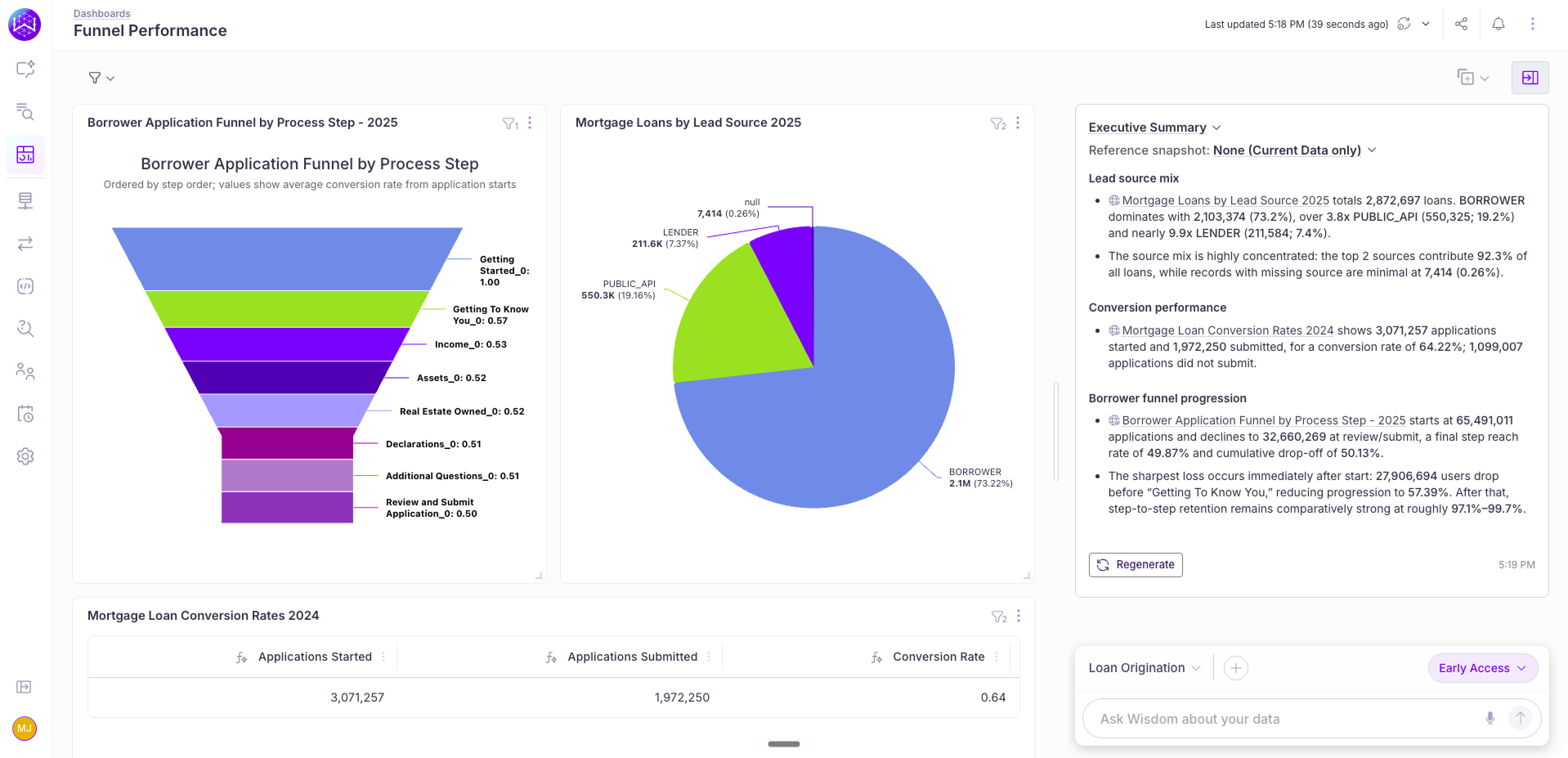
Proactive agents watch for what you haven’t thought to ask. Set a threshold. Pull-through rate drops below 60%. Average days-to-close exceeds 35. Lock volume falls more than 15% week-over-week. The moment a metric crosses your line, the agent notifies you with context on what happened and which segments are affected. No one needs to be staring at a dashboard.
The agent connects directly to your existing data, including everything Autopilot is generating. Documents reviewed, follow-ups issued, conditions cleared, time-to-pre-underwrite by loan officer, every action the agent has taken on a file. Ask “How many loans did Autopilot pre-underwrite this week?” or “Which loan officers are seeing the biggest time savings?” and the answer is one question away.
The experience is tailored to every role. A branch manager asks about their branch and sees their branch. A regional VP asks about their region and sees their region. An executive sees everything. The same question, asked by different people, returns the answer they’re meant to see. No configuration needed.
Access to Blend’s Intelligent Analytics Agent is free through June 30. It’s available now for all Home Lending customers. LO Toolkit users can enable it directly in the Reporting section. Reach out to your account partner to get started.
Four new capability toggles in the Lender Admin
Open the Intelligent Origination configuration page in your Lending Config Center this week and you’ll see four new switches in the Capabilities section. Each one was already running somewhere: behind a feature flag, on a subset of tenants, on a select beta. None of them were yours to control. That changes this week.
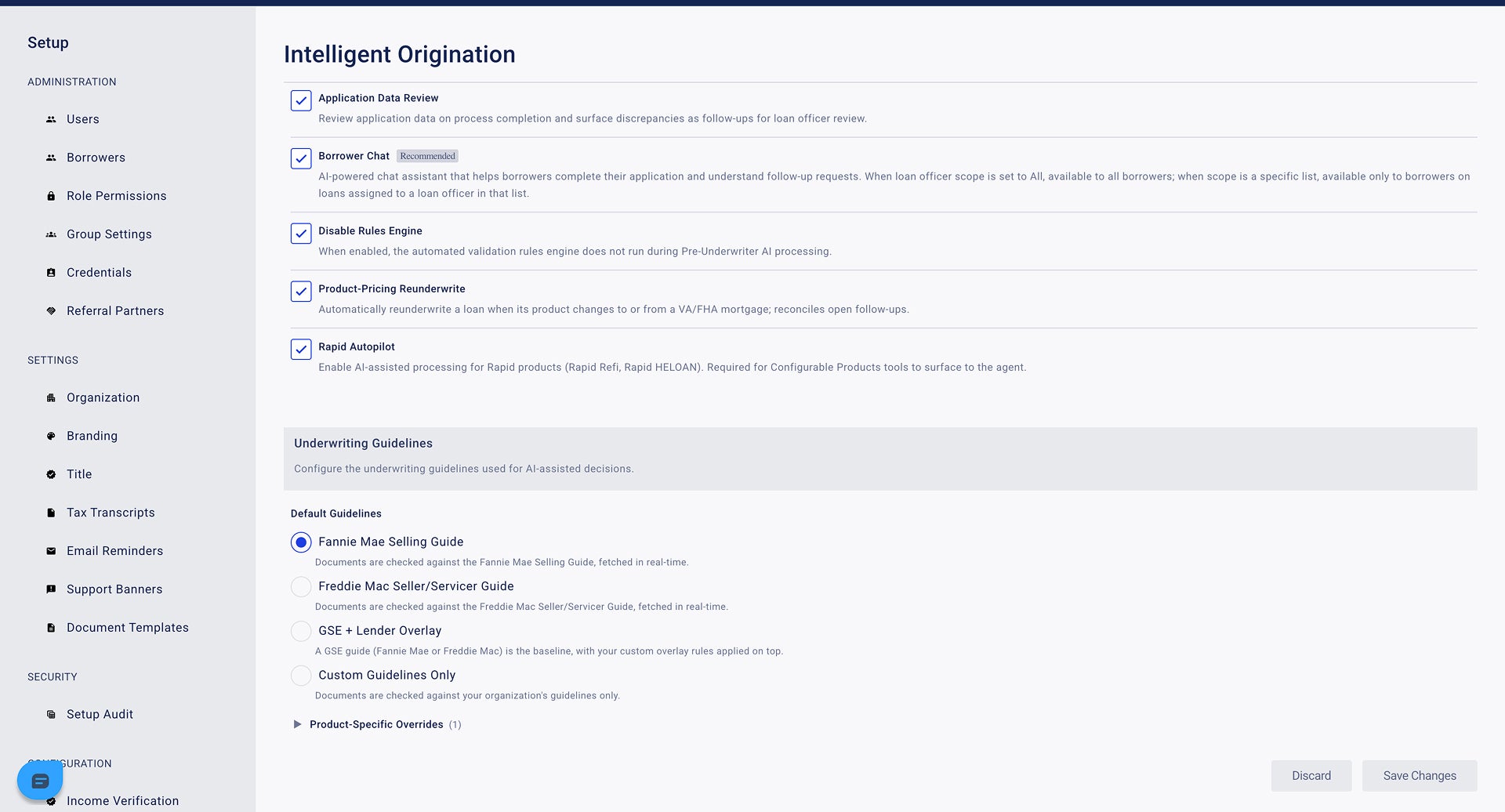
Application Data Review. When Autopilot finishes pre-underwriting a loan, the agent does a final pass over the application data itself, including the borrower’s stated income, declared assets, employment, and declarations on the URLA, and surfaces any discrepancies it finds against the documents on file as follow-ups for the loan officer to resolve. It’s a second set of eyes on the application data, automated. Toggle on, and the next loan Autopilot processes runs the review.
Disable Rules Engine. A control for lenders who want Autopilot’s pre-underwriting AI to operate independently of Blend’s existing rules engine during processing. Some lenders prefer to let the agent’s own reasoning drive follow-up creation without rules-engine inputs layered on top. Now they can.
Product-Pricing Reunderwrite. This is the toggle behind the work from Week 10. When a loan officer changes a loan’s product mid-stream (say, a quote that started conventional moves to VA after pricing), Autopilot detects the change, re-runs the underwriting analysis under the new guideline set, and reconciles the open follow-ups. It cancels what no longer applies and creates what does. Until this week, that automation ran where Blend turned it on. Now you flip it.
Rapid Autopilot. The self-serve switch for the work that shipped in Week 9. Enabling it activates Autopilot on Rapid Refi and Rapid Home Equity loans alongside flagship, with the Configurable Products tooling required for the agent to act on those product types.
All four follow the same pattern Autopilot’s existing capabilities use: clear description, off by default, save changes, configuration takes effect on the next loan. No deployment required, no integration work, and no separate flag conversation. The Lending Config Center is now the single place where every Autopilot capability is controlled.
VA and FHA guideline support is now production-grade
Two weeks ago, we added VA and FHA guideline support to Autopilot. It worked on the happy path: a loan officer selected a VA product, Autopilot detected the program switch, and the agent ran the loan under VA mode for the first event. Behind the scenes, three things weren’t quite right yet. This week, all three are.
Mode now propagates to every event on a VA/FHA loan. Previously, the first run under the new program (the product-pricing event itself) correctly resolved to VA or FHA mode, but every subsequent event for that loan (a document upload, a section completion, a follow-up created downstream) quietly reverted to the tenant’s conventional default. The agent would say “I’m running this loan under VA,” then re-evaluate the next page under Fannie. That’s fixed. The loan’s mortgage type now threads through every event resolution, so an Autopilot run on a VA loan stays on VA throughout the loan’s life.
The agent now cites the right handbook. Until this week, even when Autopilot was nominally running under VA or FHA mode, its guideline retrieval was hard-coded to Fannie’s B-series section codes. The agent would look up Fannie sections for a VA file, find nothing applicable, and improvise. Now retrieval is mode-aware end to end: VA loans retrieve from the VA Lender’s Handbook, FHA loans retrieve from HUD Handbook 4000.1, and the agent’s reasoning is grounded in the right authority for each program.
Lender overlays survive the product switch. If your tenant runs in OVERLAY mode (your own stricter rules layered on top of Fannie/Freddie), your overlay rules now apply on VA and FHA loans too. Previously, when a loan transitioned into VA mode, the lender overlay text was dropped, and your stricter risk position quietly disappeared from the agent’s reasoning for that file. The fix preserves overlay text on VA/FHA, treats it as augmentative (winning on conflict with the program handbook), and keeps your lender-specific rules in the loop regardless of which program the loan ends up under.
The result: a VA loan in production runs under VA from start to finish, with your overlay rules intact, against the right handbook. The same is true for FHA. The launch is now what it was always meant to be.
Autopilot now supports TIFF documents
Borrowers upload what they upload. Most of the time that’s a PDF or a phone photo. Some of the time, especially when documents come off a flatbed scanner or an enterprise multi-function printer, it’s a multi-page TIFF.
Until this week, TIFF was the format Autopilot didn’t speak. Gemini, the model underlying document validation, doesn’t accept TIFF natively, so those documents fell out of the pipeline and surfaced as processing errors instead of validated documents. This week, TIFF gets first-class support: when a borrower uploads a TIFF (single page or multi-page), Autopilot losslessly converts it to PDF, preserving every page, and runs it through the same validation pipeline as any other document. The borrower never sees the conversion. The loan officer never sees a “we can’t process this file” error from a perfectly readable scanned bank statement.
It’s a small format addition, but it closes one of the last gaps in what Autopilot will accept. Combined with the wrong-document detection that shipped in Week 10, the pipeline now handles the full range of what borrowers actually upload: the right document, the wrong document, the blank page, and the TIFF off the scanner, and routes each one to the right outcome.
Accuracy, reliability, and infrastructure improvements
Beyond the headline work, the team shipped a series of accuracy, reliability, and infrastructure improvements:
- Fewer duplicate “wrong period” messages: Document validation now produces more predictable verdicts on date-range requirements, reducing noise in the follow-up queue for loan officers.
- Follow-up routing tightened: A set of fixes to how the loan supervisor routes declaration-driven follow-ups (bankruptcy, foreclosure, judgments) into the right workflows, plus a correction that routes Purchase Agreement follow-ups through the document request path so the borrower’s UI renders them as document asks instead of an undifferentiated “Other” category. Borrowers now see what they’re being asked for, and loan officers see fewer miscategorized items in their queue.
- Large Deposits gating: A guardrail that prevents Large Deposits follow-ups from firing on loans where the asset workflow hasn’t completed enough to make the analysis meaningful.
- Follow-up cap: Behind a feature flag, follow-ups per loan are now capped at 500. A safety net against runaway generation in extreme edge cases. The cap is far above any normal loan, but it ensures one bad loan can’t snowball into a flood of borrower messages.
Under-the-hood improvements ship automatically to every lender with Autopilot activated.
A week about lender control. The data side gets a conversational interface: answers in seconds, dashboards that build themselves, and proactive alerts on the metrics that matter, without anyone filing a ticket. The Autopilot side gets four self-serve switches that move capabilities from behind-the-scenes flags to the same admin page everything else lives on. The VA/FHA launch from two weeks ago becomes something production can rely on end to end, not just on the first event of a loan. And the pipeline accepts one more document format borrowers were already sending. This week makes Autopilot more visible, more configurable, and more reliable in production.
Blend Autopilot is currently in preview and free to activate and use during the preview period for all Blend customers. To get started, visit your Lending Config Center or contact your Blend account team.
We publish a new update every Wednesday. Subscribe to the Autopilot weekly update to make sure you stay up to date with everything we are shipping.
Find out what we're up to!
Subscribe to get Blend news, customer stories, events, and industry insights.
Blend Autopilot Week 11 Update: Rapid, VA, and FHA Continue to Harden, Ongoing Investment in Accuracy, and Verified Income Goes End to End
When upstream income is verified, Autopilot already knows. See what else shipped in week 11.
Read the article about Blend Autopilot Week 11 Update: Rapid, VA, and FHA Continue to Harden, Ongoing Investment in Accuracy, and Verified Income Goes End to End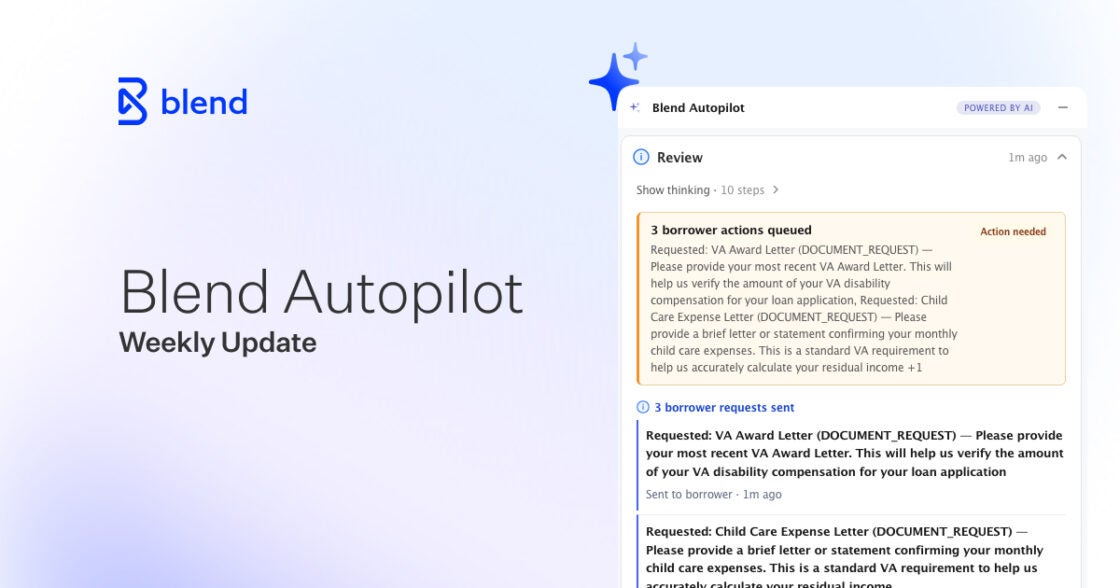
Blend Autopilot Week 10 Update: VA and FHA Guideline Support, Wrong-Document Detection, and Parallel Validation
Switch loan products mid-stream. Autopilot already knows the rules on the other side.
Read the article about Blend Autopilot Week 10 Update: VA and FHA Guideline Support, Wrong-Document Detection, and Parallel Validation
Blend Autopilot Week 9 Update: Autopilot Now Runs on Rapid Loans, Evaluates LO-Created Follow-Ups, and Refines Borrower Chat
More loan types, less noise. See how Autopilot keeps pace with your volume in week 9.
Read the article about Blend Autopilot Week 9 Update: Autopilot Now Runs on Rapid Loans, Evaluates LO-Created Follow-Ups, and Refines Borrower Chat