
June 3, 2026 in Blend momentum
Blend Autopilot Week 13 Update: Autopilot Fills In Verified Assets and Income, Picks Up Unassigned Loans, and Respects Loan Officer Judgment
Autopilot Weekly Update: Week 13

Autopilot has always been a careful reader of loans. This week, it starts doing more of the writing.
Until now, the agent reviewed documents, calculated income, and surfaced what it found, but the loan officer still had to transcribe the numbers and act on them. This week, Autopilot begins writing verified data back into the loan file directly, picks up loans that don’t yet have an officer assigned, and the agent is now configured to defer to follow-ups a loan officer creates, rather than evaluating whether its own guideline analysis would have originated them. The throughline: the agent is moving from a reviewer that hands back findings to a participant that does more of the file’s actual work.

Autopilot starts writing back
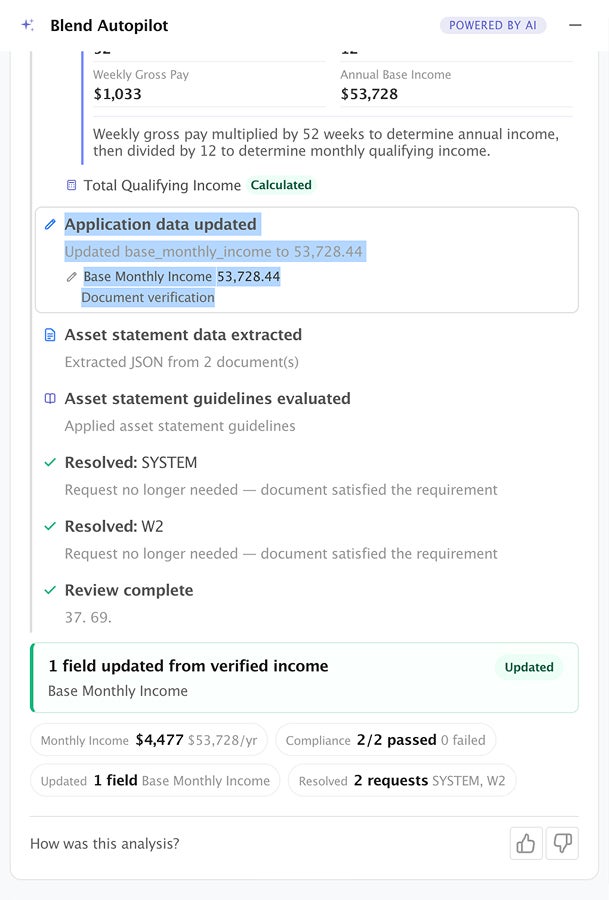
Autopilot has always been good at reading a loan. It extracts data from documents, evaluates it against guidelines, and surfaces what it finds. But when it found, say, a checking account balance on a bank statement, that number lived in the agent’s analysis. It didn’t make its way back into the application itself. A loan officer still had to key it in.
This week, that changes. When Autopilot extracts and evaluates verified data from documents, it now writes that data into the loan file for the loan officer to review. Checking, savings, and trust account balances flow into the application once the agent has read the statement and run it through the guideline check. Income does the same: employment income, non-employment income, and other income are written back into the application data as the agent calculates them.
The write-back is deliberate about a few things. It records the account institution and the last four digits when they’re available, so a loan officer can tell two same-type accounts apart instead of seeing two undifferentiated “checking” entries. And it treats the write as data capture, not an eligibility decision. The balance gets recorded even when the agent has also flagged something that needs a follow-up (a large deposit that needs sourcing, a name variation, a missing trust agreement). The concern becomes a follow-up; the number still lands in the file. The loan officer and downstream review get the data either way.
The practical effect: less manual data entry, and a loan file that fills itself in as the agent works it, rather than a review that ends with a list of numbers someone still has to transcribe.
The agent learns to trust the loan officer
Subscribe to Autopilot updates
Autopilot evaluates follow-ups it didn’t create, including the ones a loan officer or the LOS adds to a loan. The intent is good: catch duplicates, catch requests that are already satisfied by a document on file, and keep the borrower’s task list clean. But the agent had been overreaching. If a loan officer created a follow-up that Autopilot’s own guideline analysis didn’t consider mandatory, the agent would sometimes cancel it, reasoning, in effect, “the guidelines don’t require this, so it shouldn’t be here.”
That was the wrong call. A loan officer who adds a follow-up is acting on something: an investor condition, a prior conversation with the borrower, context the agent simply doesn’t have. This week, the agent’s role on human-created follow-ups gets narrowed to exactly what it should be: prevent redundancy, nothing more.
Now, when a loan officer or LOS creates a follow-up, Autopilot will only cancel it for one of two concrete reasons: a document already on file satisfies it, or an existing open request is asking for the same thing (in which case the agent merges the two, preserving any LOS reference IDs and the richer description). “The guidelines don’t mandate this” is no longer a reason to remove a request a human deliberately made. The agent’s mandate analysis governs what Autopilot originates. It never governs what it takes away from a loan officer.
The result is a cleaner division of labor. The agent still does the tedious de-duplication work that keeps the borrower’s list tidy. But the loan officer’s judgment stands.
Autopilot picks up unassigned loans
Autopilot decides which loans to work based on loan officer assignment. A lender scopes the agent to specific officers, or to everyone. But that left a gap for loans with no officer assigned yet. A freshly submitted application sitting in the queue or a loan in transit between officers fell outside the agent’s scope and waited.
This week, lenders can extend Autopilot’s coverage to those unassigned loans. With the scope option enabled, the agent picks up a loan that has no primary assignee the same way it picks up an assigned one, running its review, creating the right follow-ups, and updating the borrower’s task list as events fire. With the scope option enabled, Autopilot can begin its initial document review and follow-up creation on unassigned loans the moment they enter the pipeline. Loan officers and underwriters review Autopilot’s work when they claim the loan, giving pre-underwriting a head start without bypassing any review steps.

Reliability, accuracy, and infrastructure improvements
Beyond the headline work, the team shipped a series of accuracy and reliability improvements:
- Verified income, beyond a single provider: The verified-income flow now reads the verification source from the income report itself. The verified-income flow now reads the verification source from the income report itself, so income reported through any integrated provider (The Work Number / Equifax, ADP, Argyle, Pinwheel, or whatever a lender has configured) is captured and attributed correctly. The agent names the actual provider in its reasoning, and loan officers review the written-back figures as part of their standard file review.. The agent names the actual provider in its reasoning instead of assuming one.
- Sharper follow-up handling on external events: Autopilot now prefetches the full loan context when a follow-up is created outside its workflow, so its evaluation has everything it needs. And it no longer auto-completes a follow-up the instant one is created. This subtle fix prevents the agent from prematurely closing a request before the work behind it is actually done.
- More precise document periods: When the agent reads a date range off a document, it now normalizes that range to a full calendar span, removing a class of off-by-a-few-days mismatches in period checks.
- Guideline retrieval and evals: A cache-first path for guideline lookups with a markdown fallback keeps retrieval fast and consistent, and the eval battery was brought back in lockstep with the latest pipeline changes.
- Lending integration: The AI service API now accepts a client follow-up reference ID when a follow-up is created, so LOS-originated identifiers are preserved end to end, enabling the follow-up de-duplication described above.
Under-the-hood improvements ship automatically to every lender with Autopilot activated.
This week moved Autopilot a step deeper into the loan file. Write-back means the agent fills in verified assets and income as it works, instead of handing back a list someone still has to transcribe. Unassigned-loan coverage means pre-underwriting can start the moment a loan enters the pipeline, not whenever an officer claims it. And the change to how the agent handles human-created follow-ups draws a clearer line between the agent and the loan officer. Taken together, the week pushed Autopilot from a reviewer that reports findings toward a participant that does more of the work itself, while knowing where its judgment ends and a human’s begins.
Blend Autopilot is currently in preview and free to activate and use during the preview period for all Blend customers. To get started, visit your Lending Config Center or contact your Blend account team.
We publish a new update every Wednesday. Subscribe to the Autopilot weekly update to make sure you stay up to date with everything we are shipping.
Find out what we're up to!
Subscribe to get Blend news, customer stories, events, and industry insights.
Blend Autopilot Week 12 Update: The Intelligent Analytics Agent, Self-Serve Capability Toggles, and VA/FHA Production Hardening
More visibility, more control, and more reliability in every loan.
Read the article about Blend Autopilot Week 12 Update: The Intelligent Analytics Agent, Self-Serve Capability Toggles, and VA/FHA Production Hardening
Blend Autopilot Week 11 Update: Rapid, VA, and FHA Continue to Harden, Ongoing Investment in Accuracy, and Verified Income Goes End to End
When upstream income is verified, Autopilot already knows. See what else shipped in week 11.
Read the article about Blend Autopilot Week 11 Update: Rapid, VA, and FHA Continue to Harden, Ongoing Investment in Accuracy, and Verified Income Goes End to End
Blend Autopilot Week 10 Update: VA and FHA Guideline Support, Wrong-Document Detection, and Parallel Validation
Switch loan products mid-stream. Autopilot already knows the rules on the other side.
Read the article about Blend Autopilot Week 10 Update: VA and FHA Guideline Support, Wrong-Document Detection, and Parallel Validation